The Galaxy Note 3 colors at launch have apparently been confirmed by a publication – unsurprisingly the next Samsung flagship smartphone is said to be release in black and white.
However, Sam Mobile says that about a month after the launch, the phone will also be av
ailable in pink. Considering Samsung’s way of doing things when it comes to its previous high-end handsets, we would expect the phone to arrive in a variety of other colors in the months following the launch.
Sam Mobile says the black and white versions of the Galaxy Note 3 will start shipping in week 36 (September 2-8), while the pink version will arrive in week 43 (October 21-27).
Naturally, these ship dates sand colors aren’t official yet, even though the publication does have a great track record when it comes to reporting on upcoming Samsung devices.
We’ll thoroughly cover the Galaxy Note 3 event taking place on September 4 in Berlin, Germany, at which point we’ll tell you all there is to know about Samsung’s next-gen Galaxy Note model. Meanwhile you can check out our Galaxy Note 3 rumor roundup, or what we think we know about the device ahead of its official announcement.

Samsung Galaxy Note 3 release date, news, rumours and specs and

Posted by Unknown | 1:02 AM Categories:

Samsung Galaxy Note 3 Release Date

With a Samsung Galaxy Note 3 release date widely expected to be held in 2013, a selection of recent reports have looked to narrow down the device’s arrival.

Having failed to materialise alongside the S4 as some had predicted, the Note 3 release date has since been pegged for an IFA 2013 unveiling in early September. In recent weeks a flurry of reports have highlighted a single day for the phone’s arrival, with the Samsung Galaxy Note 3 release date expected to be confirmed on September 4. Samsung has added backing to these claims by issuing press invites to the next Samsung Unpacked launch event, scheduled for September 4, alongside the phrase "Note the date."

According to claimed “sources close to the matter,” the Samsung Galaxy Note 3 release date will follow the September 4 unveiling, with a late September / early October arrival expected to see the stylus bragging device hit retailers within days of the iPhone 5S.

The pre-IFA press day is already set to host the conference of fellow tech giants, Sony. The Note 3 isn't even the only Samsung product expected to be unveiled on September 4, recent reports out of Samsung’s native Korea have claimed that the Galaxy Note 3 will share centre stage with the Samsung Gear Smartwatch, a product known to be in the works.

"We've been preparing the watch product for so long," Samsung's executive VP Lee Young Hee said in an interview earlier this year. He added: "We are preparing products for the future, and the watch is definitely one of them."

Things have changed dramatically since the Note 2’s arrival too, with the Samsung Galaxy Note 3 not expected to be the largest smartphone on the Samsung roster come launch. Having looked to corner all market niches, the Note 3 has been preceded by an oversized, mid-range smartphone in the form of the Samsung Galaxy Mega 6.3.

With the Mega looking lacking the same stylus hosting wares as the Note range, it has been suggested that the Samsung Galaxy Note 3 will see the ‘phablet’ device sport a new generation of Samsung S-Pen stylus. It is predicted the new S-Pen will offer even more detailed control than the MWC 2013 unveiled Samsung Galaxy Note 8.0 tablet.

Samsung Galaxy Note 3 Specs

The Samsung Galaxy Note 3 is expected to be one of the most powerful phones on the market at launch, rivalling even its flagship sibling, the Samsung Galaxy S4.

“The new handset will be powered by the in-house Exynos octa-core chipset to meet consumer demand for faster data processing and download speeds,” reported insiders recently revealed. They added: “Samsung plans to use the Octa core processor in the upcoming Galaxy Note 3, which will debut later this year.”

While the S4 received octa-core innards in certain market, those nations with 4G connections (UK, US) we handed a 1.9GHz quad-core substitute. It is understood that the same will be true of the Note 3, with the UK rendition of the phone to be a speedy quad-core option.

Arguably more important, the Note 3 specs sheet will benefit from 3GB of RAM according to multiple leaks.  Allowing for improved multitasking and smoother app transitions, the 3GB of memory would be the first for a smartphone device. It has been suggested that next year’s Samsung Galaxy S5 will feature the same option.

On a camera front the Samsung Galaxy Note 3 looks set to host a strong photographic offering, with the same 13-megapixel snapper found within the S4 partnered by a Xenon flash and a second, 2-megapixel snapper up front. 

Samsung Galaxy Note 3 Rumours

A range of Samsung Galaxy Note 3 rumours have claimed the phone will be just 8mm thick. Although it is believed the Samsung Galaxy Note 3 will feature a design similar to that of an oversized S4, with a slim profile and softly curved edges, a selection of claimed leaks have pointed a boxier, squared off finish.

A selection of rumours which are far from confirmed, the discussions of the Note 3 design have pegged the phone as sporting everything from a squared off plastic finish, to a more luxurious, metal construction. In short, it is unclear as yet exactly how the Note 3 will look.


Read more at http://www.trustedreviews.com/news/samsung-galaxy-note-3-release-date-news-rumours-specs-and-price#66PQw807FHDBAZd1.99 

Top 5 Best Headphones Under $200!

Posted by Unknown | 11:31 PM Categories:


  Top 5 best headphones for your money.

5. Beyerdynamic Custom Pro One (0:46)
4. Grado SR80i (1:38)
3. V-Moda Crossfade LP (2:36)
2. Jaybird Bluebuds X (3:32)
1. Audio Technica ATH-M50 (5:40)
Slowly and steadily Google Chromebook is gaining popularity. If you go by the stats, Google Chromebook holds around 23 percent of the total number of laptops priced at $300 in US. This fact was confirmed by the market search company called NPD Group.
Last year, Google Chromebook was no wear competition for the major laptop brands. Now things have changed significantly as Google powered computers have rolled out recently and also because of the new marketing strategy adopted by the manufacturers.
If you check on Amazon.com, Samsung powered Chromebook is one of the best selling laptops out there. Do you know why Chromebook is gaining such popularity in short span of time? Here are some reasons why we feel people are purchasing Google Chromebook.
Chromebooks are CheapGood thing about the Google Chromebook that its price is as less as tablet PC. So, if you are considering buying a tablet PC, you can also consider buying a full-fledged Chromebook laptop. Also, if you look at the highly priced Chromebook Pixel, the $1300 price tag is quite less than the price tag of the competitor laptops.
The Samsung Chromebook and the Acer C7 Chromebook which is available for $250 and $200 respectively are quite popular in online stores. HP Pavilion Chromebook priced at $330 is also quite affordable which comes with 3G connectivity.
Easy to Use
Updating the software regularly and security software are something that annoys most of the computer users. Such problems are not there Chromebook. Chromebook updates and upgrades software and security on its own. So, you do not need to worry such things while using a Chromebook.
Since it does not allow you install software, it is very easy to use. The laptop has been created by the manufacturers mainly for carrying out internet related tasks.
Extra FeaturesChromebooks are always sold with additional features. Both Samsung and Acer Chromebooks are available with 100GB cloud storage on Google Drive. This allows you to store all your files on the cloud and access them anywhere as long as you are connected to internet through your Chromebook or any other device. Customers of Chromebook also get free GoGo Inflight Internet sessions that can be used in major airlines.

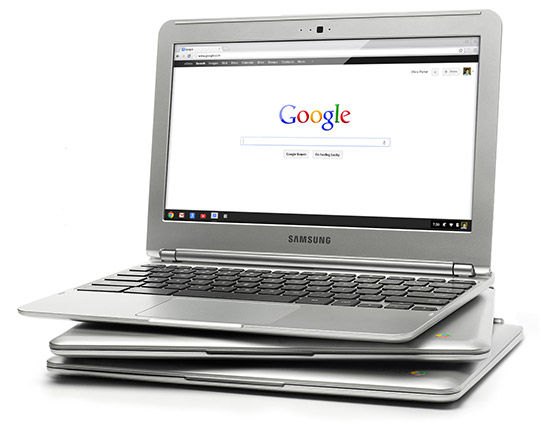
In a world full of tablets, netbooks, and Ultrabooks, Google is dipping its hand into almost every industry and seeing what sticks. The search giant recently released a refreshed version of its Samsung-made Chromebook laptop. The new Chromebook costs just $249 and runs on the same low-cost processors many Android tablets and the iPad use.
But the Chromebook doesn't function like a laptop. It feels more like a $249 web browser. If you're OK with dishing out that much to compute only within Google's Chrome ecosystem, then the Chromebook makes a solid secondary device. But it's not going to replace your primary machine.
Samsung lightened up this new Chromebook and it weighs a half a pound less than the previous Chromebook, at 2.42 pounds. Other key specs include an 11.6-inch anti-glare screen, a 0.7-inch thick body, 6.5 hours of battery life, Bluetooth 3.0 and 100 GB of free storage for two years in Google's Drive storage service.
So what exactly is the Chromebook? The idea behind the Chromebook is to run just about everything within the Chrome browser, with Google services covering your documents, email, calendar, etc. But unlike normal laptops, there's no file management system.

While Google added more of a "desktop-like" feel to the Chromebook's operating system with a home screen of icons that launch web apps in the browser, it's simply a facade. There is no way to effectively manage files that aren't Internet-based. If you don't have an Internet connection, you're extremely limited in what you can do.It's not a laptop. It's not a tablet. It's a shell that houses a web browser. That's it.
We reviewed the previous iteration of the Chromebook this past summer and enjoyed the experience but thought that the device really fell short because of a lack of 3G/LTE. To Samsung's credit the revamped Chromebook now features 3G connectivity, but this data connection comes at a $80 premium. The 3G only includes 100 MB per month for 2 years via Verizon Wireless, which admittedly isn't enough. If you want more you'll have to pick one of the
"flexible" pricing plans for additional mobile service.
There is also a more powerful version, Chromebook 550, which is a beefed up version of the less expensive Chromebook that retails for $449 and uses an Intel Core processor to get you six hours of battery life.

Some positives:
• Google's new Chromebook is a lot sleeker. The OS is snappier too, booting up in just 10 seconds.
• Users have access to Google's Chrome Web Store. This is really where you can personalize the device and make it unique. The Chrome Store is full of thousands of apps, extensions, and themes.
• The device is shareable, allowing you to create your own user account and others for family and friends. Google says the benefit of multiple accounts is that, "everyone has their own files, apps and settings, and you never have to worry about anything getting messed up by someone else."
• Chromebooks can automatically update themselves, so you don't have to be bothered with staying current. Users also don't have to worry about viruses and malware.
• The Chromebooks automatically back themselves up too so you never have to worry about losing your work.
• Mobile connectivity is still missing from the cheapest Chromebook.
• The problem with the Chromebook is that it's a device completely dependent on an internet connection. When you don't have the Internet, you can't really do anything.
• Yes, there are offline documents, offline Gmail, and you can play media you've already downloaded, but these features work best on the internet and without a connection there is really little to do.
• The Chromebook is not for a power user. It's for a consumer who wants to get things done and enjoy the web without all the extras most computers come with. It's dead simple to go online, read email, download Chrome Store apps, and create a document. If you want to do anything beyond that, you're better off with a regular Windows or Mac laptop.
What about the thousands of apps available for the device?
Apps work just like they do in the free Chrome browser on your primary PC. Chrome Apps download from the web and open in separate tabs inside your browser. The Chrome Store has plenty of apps for offline use, which helps. If only the Chromebook would run Android apps, then we might have a real winner.
Should you buy it?
Overall, the Chromebook still feels like it doesn't have a place in the world. If you're looking for an ultra-portable device to simply browse the web and enjoy media, you're probably better off getting an iPad or similar tablet. But if you're a Google addict and require a keyboard, then the Chromebook may be for you.


Read more: http://www.entrepreneur.com/article/224877#ixzz2cbM8E7Ya

Google Edition HTC One Review!

Posted by Unknown | 4:56 AM Categories:

Published on 14 Jul 2013
Google Play Edition HTC One is here - A flagship with a new personality!

Google Edition HTC One: http://goo.gl/jYnfe

Beats Audio: Explained! http://youtu.be/Cdbn_pmxFic
Ultrapixel Camera: Explained! http://youtu.be/ul3lgaU_lbY

HTC One Review: http://youtu.be/KF75-HPdUfY
HTC One vs Galaxy S4: http://youtu.be/jpiPzgBJU9M

Top 5 1080p Smartphones: http://youtu.be/swXI_sl5m3I

Google Play Edition HTC One ROM: http://goo.gl/1jE9p

Song used in audio test: http://youtu.be/x6-n6sMhL3I

Video Gear I use: http://amzn.com/lm/R3B571T7PT4PWM

Intro Track: ASDF Movie Song
Outro Track: "Channel 41" by Deadmau5


Quad Core Android 4.2 Smart TV Dongle - Android 4.2 Mini PC

Posted by Unknown | 4:03 AM Categories:
HDMI Android 4.2 TV Dongle "Generation" -http://www.chinavasion.com/CoreAndroi... - Quad Core 1.6GHz CPU, 2GB RAM (White)

Transform your front room into An Android power house with this TV dongle known as the "Generation". This next generation of TV dongles has a 1.6GHz quad core CPU to power it along, just simply plug the rightly named "Generation" TV dongle directly into your TV's HDMI port. The lightning fast 1.6 GHz Quad Core CPU provides more than enough power to easily multitask and run the most demanding apps and games without any problems. This product also supports WiFi N connection, therefore you can surf the internet and take advantage of some of the online functions that Android provides. Bring your TV to life by playing games and streaming videos directly from the internet on to your large TV

This TV dongle will not just benefit the pleasure side of transforming your TV into a power house but also will help on your working side as you can download applications to help benefit you with work. The "Generation" TV dongle has an Android 4.2 Jelly Bean operating system, which is one of the most advanced operating systems today. Now only is Android 4.2 being fast, it also gives you a high level of customization options and a big app store with more than 700,000 apps. 

The next generation of TV dongles has arrived with this Android TV dongle known as the "Generation". This product is in stock and can be dispatched within 24 hours of ordering with a 12 month warranty. Brought to you by the leaders in wholesale electronics and TV boxes, Chinavasion.

So what’s the big deal about Google TV getting Android 4.2

Posted by Unknown | 4:00 AM Categories:
Google IO came and went and we were left with a huge itch for new Google TV devices. Needless to say nothing “exciting” was announced at Google’s yearly developer conference. In fact, Google TVwasn’t even mentioned during the keynote, but that doesn’t mean that it wasn’t a good year for us.
Google did announce that an update to Android 4.2.2 (and Chrome) would come to Google TV. Well, that’s pretty cool, right? We all love updates… but what is the big deal about it? Will it just helpdevelopers? Will it have some amazing new features?! Truth is, it probably won’t but it will improve the Google TV experience in the lung run. Here is how:

Apps, Apps And More Apps!

lg-google-tv-explodedThe biggest complain about Google TV is the lack of apps. Though it has enough to get us by, we don’t get even close to getting the amount of apps otherAndroid devices benefit from. LG mentioned that its TV sets would get Android 4.2.2 during Q3, and that the main upgrade would be the ability to access more apps designed for smartphones and tablets.
Of course, most of these will not offer an optimal Google TV experience, but at this point I will be happier with some weird-looking apps than with no apps. We do still wish more developers would jump on board with Google TV, though. Did you hear LG is selling 10,000 Google TVs per month in the US?Maybe you want to jump on board now, devs!

Better Performance And Speed

We must remember Project Butter was introduced in Android 4.1 Jelly Bean, which included a series of enhancements that made the OS much smoother and faster. This means Google TV’s Android 4.2.2 update should bring these enhancements as well!
Google TV devices are usually not the fastest. We won’t blame that completely on the software, as Google TV’s specs also tend to be less than premium. Software probably plays a big part, though, and we can expect this update to do wonders, just like Android 4.1 did for smartphones and tablets.

Wrap Up

This year’s Google IO focused mostly on developers, which means that it focused on you! What matters most is your experience with Google’s products and services. Sure, we would have loved to see some exciting new toys to play with, but at the end what will benefit you the most? A better experience, and this is what Android 4.2.2 for Google TV is all about.
You want more apps? You are getting them (albeit not exactly the way we wanted them). You want a faster, better device? You are getting that too! It’s a win-win situation, guys.

Review: Samsung Galaxy Camera

Posted by Unknown | 3:49 PM Categories:

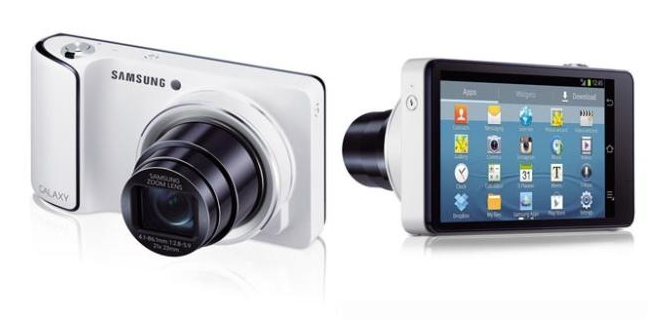
There was a time when people were required to snap photos and look for an usb to transfer all the pictures in to a pc. Instant sharing was almost impossible. It require sometime to shared on web especially on the social media. But, Samsung with its fascinating galaxy camera has made it quite easy. The galaxy camera from Samsung is not an ordinary camera. It has an android service attached to it, through which users can enjoy web surfing and can do instant sharing of the snapshots they have taken at the social media.
 Samsung-Galaxy-Camera-Review
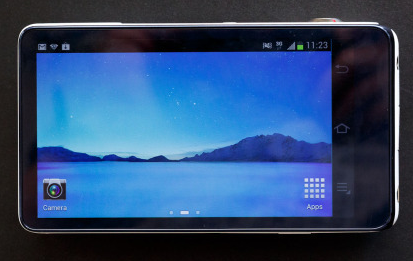
When you look it from the front it looks like a basic camera but turning it backwards shows a big 4.8-inch HD touch screen quite similar to Samsung Galaxy S3’s one. That is why; when you keep the touch screen upright it looks like S3 is on show. The camera consists of all the Google apps and also has LTE. WIFI is enabled and is updated up Android 4.1 Jelly bean update. The device doesn’t allows its users to do messaging or do calling as it doesn’t looks good with the design of the camera. But, the most worthwhile feature is instant sharing on the main of the phone icons of all the social media sites are provided so sharing is one click away after the capturing of the photos.
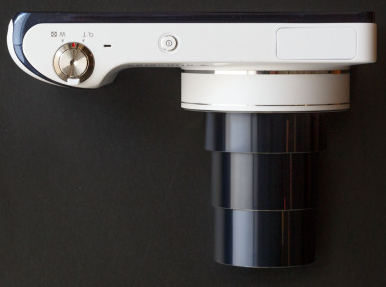
Samsung Galaxy Camera lens extended
The camera has features of being 16.3 mega-pixels and has up to 21x zooming option. The shots taken from the camera were better than the snapshots taken from the either Iphone 5 or Samsung Galaxy. In natural lightning the picture result was good, but, in low lights the results weren’t that good. So, we can conclude are just average to what a typical camera results are.
  • 16.3 megapixel BSI CMOS sensor
  • 21x optical zoom lens, f/2.8-5.9, 23mm wide angle
  • Optical image stabilisation
  • 4.8inch 16:9 touch screen 1280×720 HD resolution
  • 1.4GHz quad-core processor
  • P/A/S/M Manual controls
  • ISO100-3200
  • 8GB memory built in
  • Photo wizard, Best Group Pose
  • Smart Content Manager
  • Google Play Store – download apps etc
  • 3G / 4G / Wi-Fi / GPS / Cloud backup
  • Android 4.1 (Jelly Bean)
  • MicroSD/SDHC memory card slot
Samsung Galaxy Camera Screen
The camera also has some fascinating features too. These include: best photo and continuous shoot. Best photo selects the best shot of the eight shots you have taken of a particular object. The continuous shoot allows continuous snapping of photos; this particular feature is worthwhile especially when you need a lot of pictures of some movement objects. One can also cover videos of up to 1080p quality. The camera has awesome editing features one can change the contrast of the pictures , add frames and can add a lot to the pictures and make the pictures one to be remembered all along the life time. 

Samsung Galaxy Camera Review!

Posted by Unknown | 3:43 PM Categories:


Samsung Galaxy Note 3 could be 6.3-inch eight-core monster

Posted by Unknown | 3:41 PM Categories:

Think the Samsung Galaxy Note 2 is big? Take note, because the Note 3 could break six inches.
The Korea Times quotes a Samsung boss talking about how the next Note will pack Samsung's eight-core chip and a bigger 6.3-inch screen than the current 5.5-inch display. If that does turn out to be the case, an extra inch on the diagonal is quite a boost -- in fact, that edges it towards the 7-inch territory of the Google Nexus 7 and other mini tablets.
Is that excessive? After all, the Note is meant to be big. But it's also meant to provide a middle ground between phone and tablet, and six or seven inches is getting too big to hold with one hand.
Underneath the screen, the Note 3 is expected to be powered by the newly announced Samsung Exynos 5 Octa processor, an eight-core behemoth of a chip.
The Octa features four low-power cores for everyday tasks, and switches to four high-performance cores for more intensive tasks. That way you get superb performance when playing fast-paced games, high-definition videos or heavy multi-tasking, but without draining your battery.
Whatever form the Note 3 takes, the Note and Note 2 were both launched towards the end of the year so we won't see the new model for a good long while yet. In the meantime check out our 25 Note 2 tips for getting the most out of your 5-inch phone.
Should the Note get any bigger or is already the right size? Tell me your thoughts in the comments or on our Facebook page.

Nexus 4 Review and Giveaway (video)

Posted by Unknown | 7:53 PM Categories:

Top 5 Android 4.1 Jellybean Features!

Posted by Unknown | 4:05 AM Categories:


The best of Android 4.1 Jellybean features on the Galaxy Nexus! Thumbs up!

1. 0:23 Project Butter
2. 1:30 Interactive Notifications
3. 2:56 Widgets and Homescreens
4. 4:04 Polish... The little things
5. 5:28 Google Voice Search / Google Now


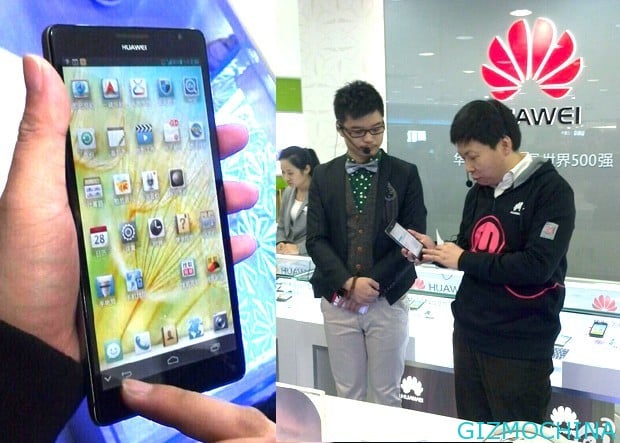
Huawei Ascend Mate Size Comparison at CES 2013!

Posted by Unknown | 10:23 PM Categories:


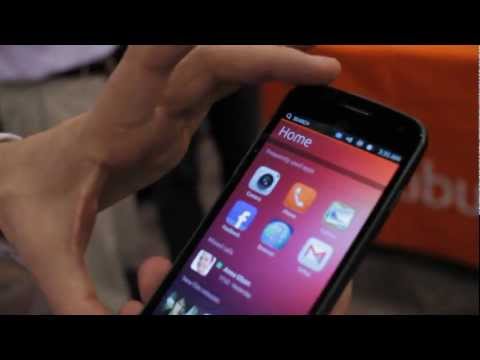
Top 5 Ubuntu Phone Features: Explained!

Posted by Unknown | 10:18 PM Categories:


iPhone 5 review

Posted by Unknown | 4:49 PM Categories:

This is it. Check out video review of Apple's iPhone 5 from engadget.com


Drop Test: Samsung Galaxy S3

Posted by Unknown | 4:48 PM Categories:


This week we drop test the Samsung Galaxy S3. If it survives, we give it away to you guys. If it doesn't, we destroy it spectacularly but still give it away to the most creative comment. If you missed the unboxing and review, don't forget to check those out as well.


Thanks to GizmoSlip..


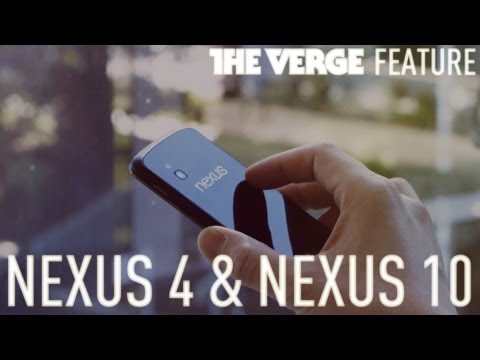
People increasingly have more than one device, and they switch between them many times a day. Nexus—Google’s hardware line for Android devices—gets rid of the hassle. Just sign in with your Google Account and everything is there ready to go, whatever device you’re using: photos, emails, contacts, bookmarks, even your entertainment on Google Play.

Today, we’re excited to announce three great new Nexus devices … in small, medium and large. And they all run Android 4.2, a new flavor of Jelly Bean—which includes the latest version of Google Now and other great new features.


Nexus 4 with Google Now and Photo Sphere 
Nexus 4 is our latest smartphone, developed together with LG. It has a quad-core processor which means it's super fast, a crisp 4.7" (320 ppi) display that's perfect for looking at photos and watching YouTube, and with wireless charging you just set the phone down on a charging surface to power it up, no wires needed. While Nexus 4 is incredibly powerful under the hood, it also features the latest version of Jelly Bean, Android 4.2—the simplest and smartest version of Android yet. Starting with the camera, we've reinvented the photo experience with Photo Sphere, which lets you capture images that are literally larger than life. Snap shots up, down and in every direction to create stunning 360-degree immersive experiences that you can share on Google+ with friends and family—or you can add your Photo Sphere to Google Maps for the world to see.

Android 4.2 brings other great goodies like Gesture Typing, which lets you glide your finger over the letters you want to type on the keyboard—it makes typing fast, fun and a whole lot simpler. Android 4.2 also adds support for wireless display so you can wirelessly watch movies, YouTube videos and play games right on your Miracast-compatible HDTV.

Learn more about all of the new features of Android 4.2, Jelly Bean, here.

Google Now—even more useful 
We designed Google Now to make life simpler by giving you the right information at just the right time in easy to read cards, before you even ask. And the feedback has been awesome. So today we’re adding more cards that we hope you’ll find useful. Flight information, restaurant reservations, hotel confirmations and shipping details—how often have you found yourself wading through your email to get this information at the last moment? So next time you book a table for dinner, you’ll get a reminder with all the details without ever having to lift a finger. You’ll also get cards for nearby attractions, interesting photo spots, movies times at nearby theaters or concerts by your favorite artists.

Nexus 7: Thin, light and now even more portable
Nexus 7 brings you the best of Google–YouTube, Chrome, Gmail, Maps–and all the great content from Google Play in a slim, portable package that fits perfectly in your hand. To give you more room for all that great content you can now get Nexus 7 with 16GB ($199) or 32GB ($249) of storage. But we also wanted to make this highly portable tablet even more mobile. So we added HSPA+ mobile data. Nexus 7 is now also available with 32GB and HSPA+ mobile ($299), which can operate on more than 200 GSM providers worldwide, including AT&T and T-Mobile in the U.S. 

Nexus 10: Powerful and shareable 
Nexus 10 is the ultimate tablet for watching movies or reading magazines. We wanted to build a premium entertainment device, so we partnered with Samsung to do just that. Nexus 10 is the highest resolution tablet on the planet with a 10.055" display at 2560-by-1600 (300ppi), that's over 4 million pixels right in your hands. It comes with a powerful battery that will get you up to nine hours of video playback and more than 500 hours of standby time. With a set of front-facing stereo speakers, you can watch movies right from your Nexus 10 and they simply sound awesome. But what makes Nexus 10 unique is that it's the first truly shareable tablet. With Android 4.2, you can add multiple users and switch between them instantly right from the lockscreen. We believe that everyone should have quick and easy access to their own stuff -- email, apps, bookmarks, and more. That way, everyone can have their own home screens, their own music, and even their own high scores.


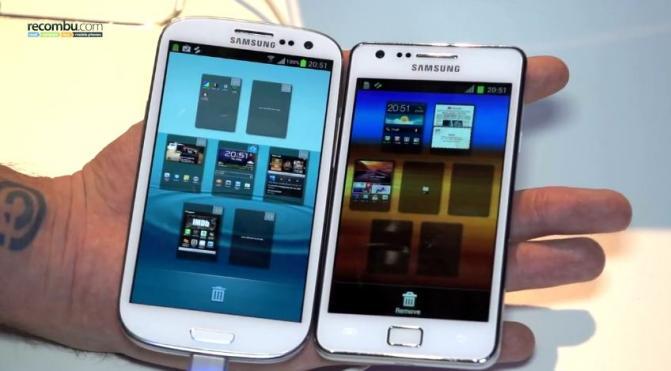
Samsung Galaxy S3 vs Samsung Galaxy S2

Posted by Unknown | 3:06 PM Categories:
Much has been made about the launch of the new Samsung Galaxy S3 android smartphone. Samsung has published its arrival aggressively and most of those who have already invested in the new Samsung model have reported positively on it. We thought we should have a look at the main differences between the S3 and its predecessor, the popular Samsung Galaxy s2, in the key areas that people tend to look at when they are thinking about investing in a smartphone


Size and Weight
The most obvious difference between the Galaxy S2 and S3 is that the S3 is bigger. It measures 136.6 x 70.6 x 8.6mm, whilst the S2 measures 125.3 x 66.1 x 8.5mm. This makes the Galaxy S3 approximately 16% bigger. Not surprisingly, as a consequence, the S3 is heavier, weighing 133g compared to the S2′s 116g.
Screen/Display
There is no doubt that, in comparing the display of the S3 and the S2, the newer model comes out on top. The Galaxy S3 has a whopping 4.6-inch HD display with a super sharp 1280 x 720 pixels resolution. The display has Super AMOLED with Pentile Matrix and TouchWiz screen and a pixel density of 319 ppi. These specifications compare favourably with the S2′s 4.3-inch HD display with its 800 x 480 pixels resolution, Super AMOLED Plus touch-screen and pixel density of 217 ppi.
Processor
In terms of performance, the Galaxy S3 once again beats its predecessor. The S3 has a 1.4GHz Exynos system-on-a-chip (SoC) quad-core processor, with 1 Gigabyte of RAM, which is around twice as powerful as the 1.2GHz Cortex dual-core processor in the s2.
Camera/Video
The cameras are pretty comparable, with the S3 having the odd advance. Both have 8-megapixel cameras with LED flash with 1080p full HD video capacity. The S is capable of recording at 30fps and taking photographs simultaneously. It is also a quad-band device and supports HSPA+ (21Mbps), WiFi 802.11 a/b/g/n, energy efficient Bluetooth 4.0, NFC, GPS and GLONASS. The s2 also has an 8-megapixel camera which has full HD 1080p @ 30fps capacity. It also has HSPA+ (21Mbps) network support, WiFi 802.11b/g/n, Bluetooth 3.0 in addition HDMI-out with mirroring and DLNA for media sharing. The s3 has faster shutter speed, faster photo sharing speed and Best Shot. The front-facing camera has also been upgraded from 1.3MP to 1.9MP.
In-Phone Storage
In addition to providing the 16GB and 32GB storage of the S2, the Galaxy S3 also offers a 64GB version, which is up there with the iPhone. Both smartphones have a micro SD port. The s3, however, also offers a free 50GB of Dropbox storage.
Software
The operating system for the S3 is Google’s Android 4.0 Ice Cream Sandwich. This includes “intelligent” features like ‘Smart Stay’ where you can make a phone call to one of your contacts just by lifting your phone to your ear or keep a screen alive by its ability to detect if you are looking at it and ‘S-Voice’, which is Samsung’s equivalent of Apple’s Siri.
Battery Power
The battery capacity of the S3, at 2100mAh is bigger than that of the S2, at 1750mAh. This increase in battery power was necessary, however, bearing in mind the greater demands placed on the battery by the newer version.
Summary
There’s still a lot to be said for the Samsung Galaxy S2 and we wouldn’t recommend bringing a contract to an early end to update to the newer version. When you are able to update to the Samsung Galaxy S3, however, we’re sure that you will find it a step up from the earlier model.
  • RSS
  • Delicious
  • Digg
  • Facebook
  • Twitter
  • Linkedin
  • Youtube